

Step 1
- Log into cPanel.
- Navigate to email, Create a new email address,Here’s a Link to our knowledgebase article if you don’t know how to create a email account with cPanel
- Copy the new email address you just created.You will have to paste the copied email address into your contact form inside of your sitebuilder.
Step 2
- Navigate to the page where the contact form is located.
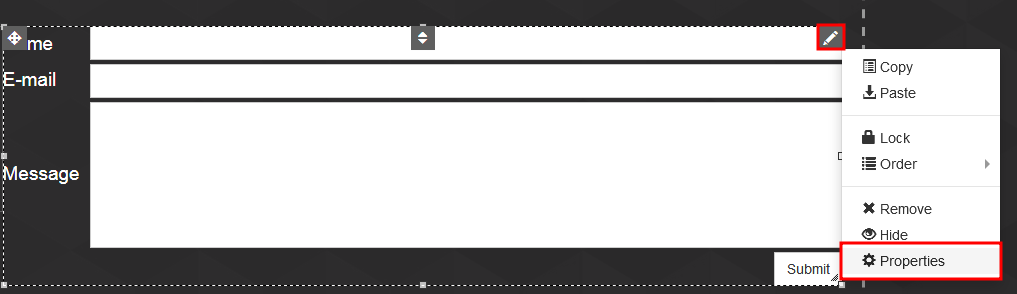
- Hover your mouse over the form and click on the pencil icon in the top right corner. Click on Properties (from the list).
Step 3
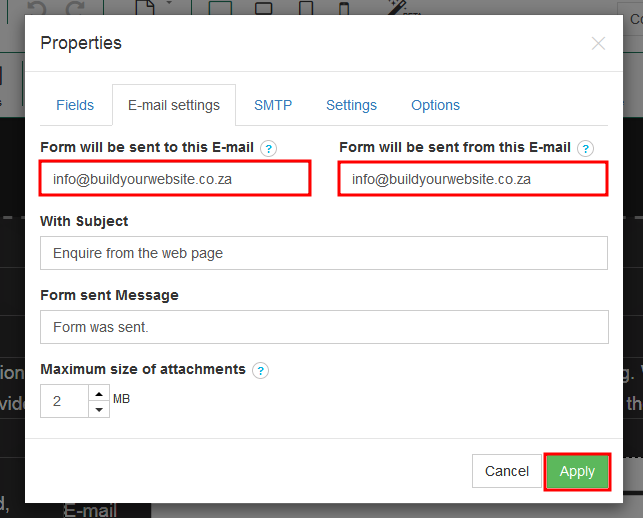
- Click on E-mail settings (at the top of the Properties dialog box).
- Enter your email address in the two email boxes.
- Click on Apply.
- Click on Publish.
Step 4
- Test the form by going to your website, fill in the contact form.
- Check your mail inbox to see if you got a email from your website.
