Step 1
Login into cPanel
Step 2
Navigate to "email" click on "Autoresponders"

Step 3
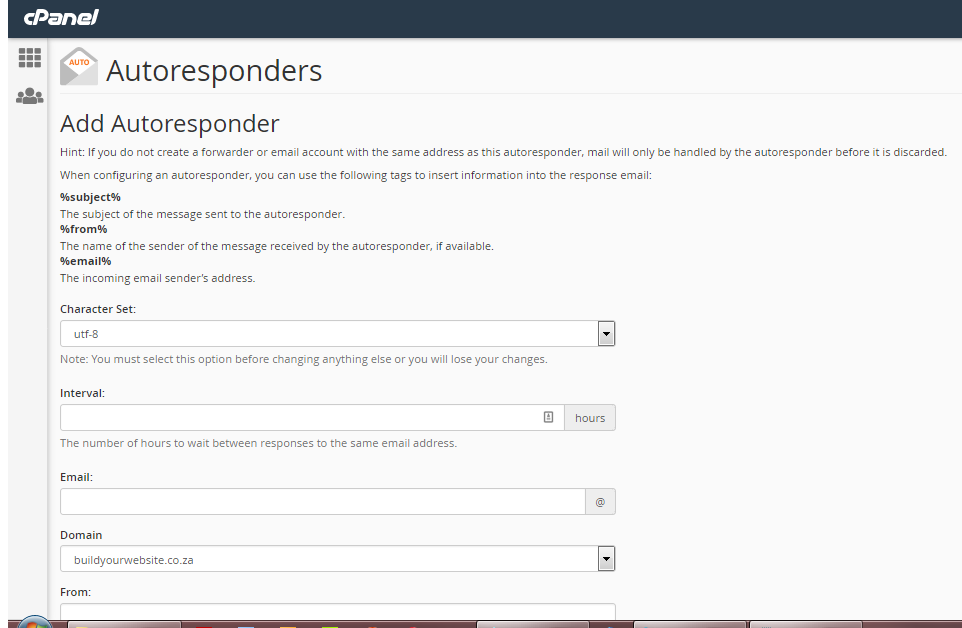
Fill in the below form and click "Create"
Some tips :
- I recommend leaving the Character Set on utf-8.
- Set the interval to 8 hours. This interval controls how often a sender will receive your auto-reply. You don’t want your colleagues to get an auto-reply every time they email you if they send you a handful of messages throughout the day.
- Enter your full name in the From field.
- Enter something like Auto Reply or Out of the Office in the Subject field.
- Leave the HTML box unchecked.
- Enter the message you’d like to auto-send as a reply to incoming emails.
- Use the Start and Stop options to set start and end dates and times.
- Finally, click “Create/Modify”.
- Click the Log Out button in the upper right corner. That’s it.
If you configured it to start immediately, you can now send a test message from another email accounts to make sure it’s working.