

Step 1
- Log into cPanel.
Step 2
- Navigate to "Email"
- Select "Default Address"

Step 3
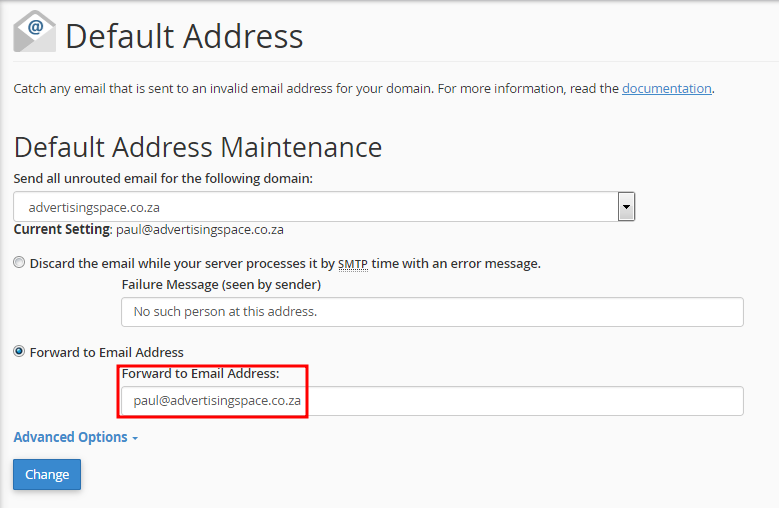
- Type in the email address you want to use as your Defualt Address in the field below as shown in the picture.
- Tick the box "Forward to email address".
- Click "Change"
Open Outlook 2010. Go to File -> Info -> Add Account. Select the "Manually configure server...
Step 1 Log into cPanel and navigate to "Email" Step 2 Click on Forwarders (located in the...
Log into cPanel and navigate to Email Accounts Click here to log in to your cPanel account....
Step 1 Open your browser of choice(Google Chrome, FireFox, Opera mini). Type in...
Powered by WHMCompleteSolution
Create a Website with New Woza Online Website Builder, the South African Business Woza Online Alternative. Our Online SiteBuilder makes it simple for you to create a website. Create your own website TODAY!
Copyright © 2026. New Woza Online. All Rights Reserved.
