

Different layouts ( mobile , desktop, etc)

Step 1

Log into cPanel.

Step 2

Navigate to Software click on New Woza Online sitebuilder.

Step 3

These are the diffirent layouts you can use for your website.

  • Wide
  • Desktop
  • Tablet
  • Mobile


Step 4

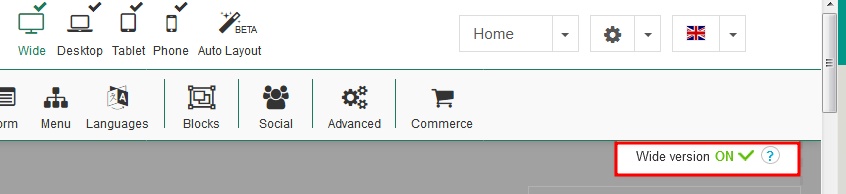
How to switch layouts on and off.

Click on the highlighted section as shown below to switch layouts on or off
 

  • 0 Users Found This Useful
Was this answer helpful?

Related Articles

How to restore your website from a previous backup made

Step 1 Log into Cpanel. Navigate to Software. Click on New Woza Online SiteBuilder. Step...

How to make backups of your website (your responsibility)

Step 1 Log into cPanel navigate to software click on New Woza Online sitebuilder. Step 2...

How to add new pages

Step 1 Log into cPanel navigate to software Click on SiteBuilder. Step 2 Click on the drop...

How to publish a website

Step 1 Log into cPanel navigate to software Click on SiteBuilder. Step 2 Click on the...

How to add images

Step 1 Log into cPanel navigate to software Click on SiteBuilder. Step 2 Click on Picture....

Powered by WHMCompleteSolution

