

Step 1
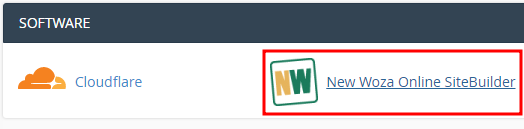
- Log into cPanel.
- Navigate to software.
- Click on New Woza Online SiteBuilder.
Step 2
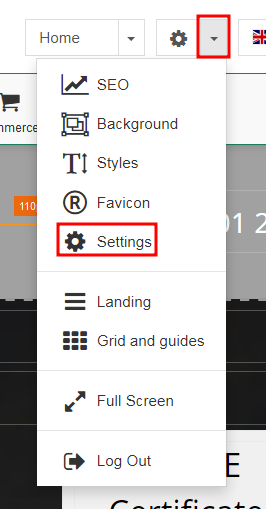
- Click on the drop-down menu of the gear.
- Click on settings.
Step 3
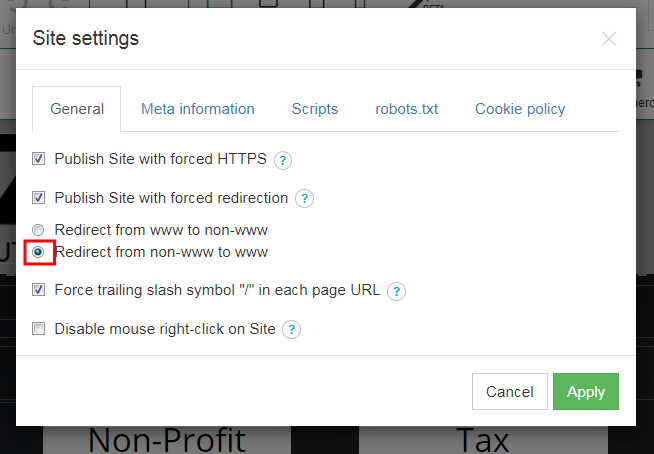
- Select the "Redirect from non-www to www".
- Click apply.
Step 1 Log into Cpanel. Navigate to Software. Click on New Woza Online SiteBuilder. Step...
Step 1 Log into cPanel navigate to software click on New Woza Online sitebuilder. Step 2...
Step 1 Log into cPanel navigate to software Click on SiteBuilder. Step 2 Click on the drop...
Step 1 Log into cPanel navigate to software Click on SiteBuilder. Step 2 Click on the...
Step 1 Log into cPanel navigate to software Click on SiteBuilder. Step 2 Click on Picture....
Powered by WHMCompleteSolution
Create a Website with New Woza Online Website Builder, the South African Business Woza Online Alternative. Our Online SiteBuilder makes it simple for you to create a website. Create your own website TODAY!
Copyright © 2026. New Woza Online. All Rights Reserved.
